Today begins a new adventure for me. After trying to like Solaris 8 and finding it too old, and trying to like Solaris 11 and finding it too Enterprisey EnterpriseWare™, and unsuccessfully trying to boot Linux plenty of times, I am going to install FreeBSD 10.1 on my Sun Ultra 60. Some specs…
- UltraSPARC-II 360MHz (supposedly equivalent to a Pentium III, which at the time was huge)
- 512MB RAM (again, at the time it was released, this was more than anyone would ever need)
- 18.6GB Fujitsu SCSI disk, which doesn’t give me a whole lot of room but is sufficient (I’ve run FreeBSD 9 on a P4 with a 20GB disk, with KDE and X, so…)
- Creator 3D UPA graphics – full 1080p, with 3D and 2D acceleration – in 1999.
- OpenBoot 3.31
You may be asking why I would use this computer. I have a few reasons. One is that I love utilising different CPU architectures and computers for what they do best. I’m thinking about playing around with some older graphics demos and seeing what I can get OpenGL/SDL2 to do with this. Considering that at the time it was 10x more powerful than any PC around, it may be enough to get some small-ish demos running at good speed. Another reason is that it’s just a fun project, and another big-endian architecture besides PowerPC that I can use for endianness testing. I also am looking forward to porting SuperGameHerm to the SPARC architecture if I am able.
I’ll be blogging about using and maintaining this system as I continue to use it, but for now, some installation notes!
Booting the System.
This computer is notoriously fickle to boot. I had to hold the STOP+N keys to clear the NVRAM to be able to see video at all. STOP+D is also a useful key combo, as it turns on the POSTs and ensures all the devices are working properly. All devices passed in my unit, so I proceeded at the OpenBoot “ok” prompt to type boot cdrom and watched the system boot up.
Booting the Kernel.
I watched with glee as the system booted the FreeBSD 10.1 kernel, but the glee quickly turned to dismay as I saw…
cd0: cd present [269120 x 2048 byte records]

Trying to mount root from cd9660:/dev/iso9660/10_1_RELEASE_SPARC64_CD [ro]...

warning: no time-of-day clock registered, system time will not be set accurately

|
No disk activity. The CD drive was quiet. The fans weren’t even spun up, so there was no CPU activity. It was quiet… Too quiet… Eerily quiet for what was supposed to be a noisy, happy FreeBSD install. I pressed STOP+A to try and break into OpenBoot. The system was locked solid and it would not respond. Fortunately, it seems to be a glitch, and resetting the system (power down and power up) fixed this issue.
Installing the FreeBSD.
Since the Linux install failed and I already saved the contents of the SPARC slices, I used the Automatic Disk partitioning, which created a 17 GB / and 800 MB swap slice. This should be enough for most builds. It may not be enough for Qt, but I will probably not build Qt on here anyway. Now the fun part: Installing the distributions (somewhat akin to package sets on Linux, I guess). I downloaded the full Disc 1 ISO and burned it to a CD so I did not have to configure the network or wait for the – sadly only 10Mbit – Happy Meal Ethernet to download any files. It verified the checksums and immediately began installing to my local disk drive.
Note that I saw a few odd errors: “sym0: unexpected disconnect”. This didn’t seem to affect the installation any, so I’m not sure what exactly is going on here.
After that was finished, it was time to set up the devices. I configured networking (v4 + v6), added a user account for myself, and then set out to install pkg-ng, the FreeBSD package management tool that makes FreeBSD so amazing and easy to use. Sadly, it does not support SPARC64, only the Intel x86 family of systems. The first order of business, then, is making a pkg-ng server for myself. I will cover that later, when I’m able to get that going. For now, it’s ports (building from source) only.
Booting into the FreeBSD!
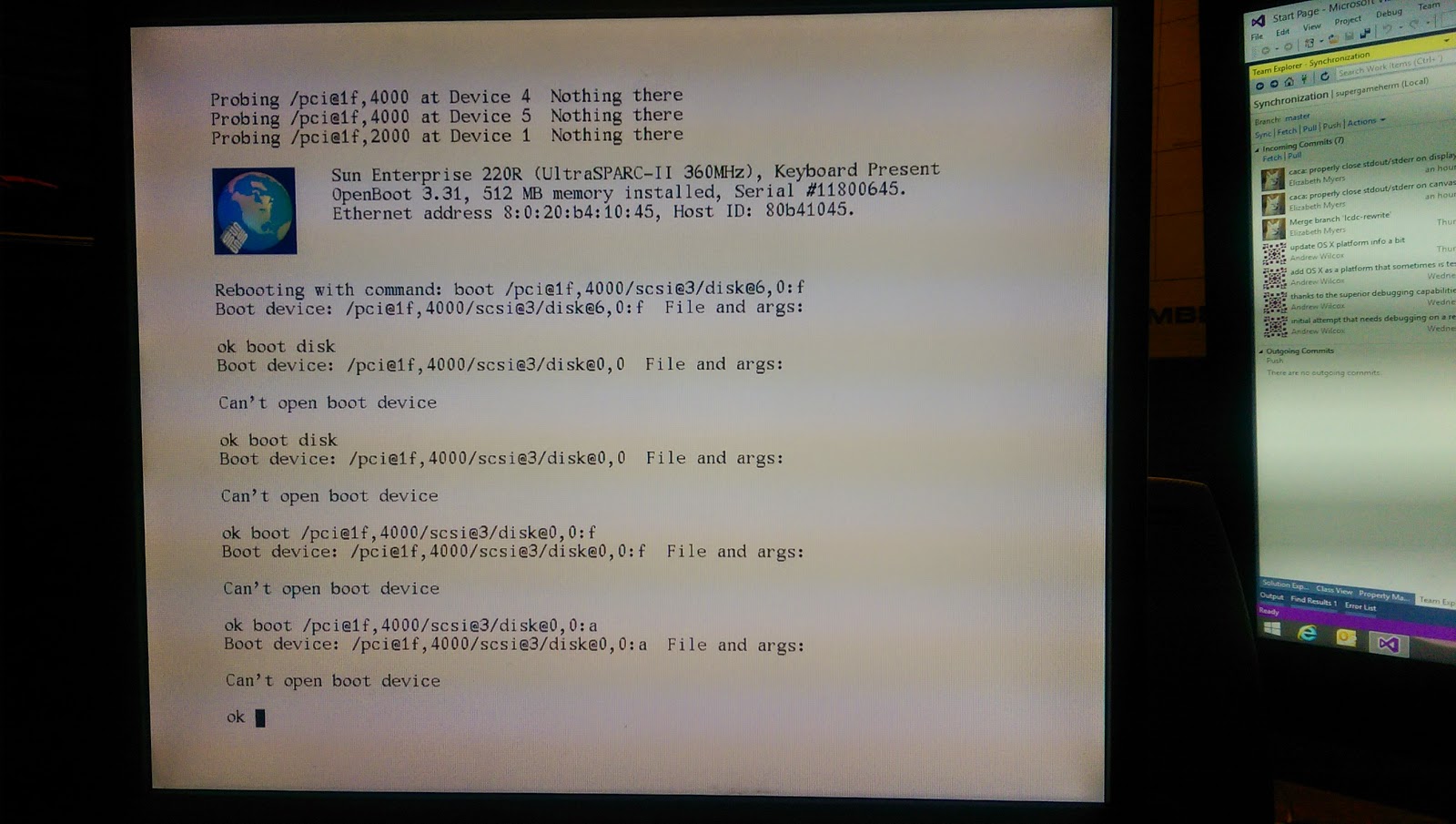
And now, everything is finished. Eject the CD and reset the system. This is going to be wonder—-ful?
Luckily, one of my friends is an experienced SPARC sysadmin so she is going to help me fix it. Later today I will post the resolution, but first we have to find it. Until then, happy hacking!



 The Cat Fox Life