After a long and somewhat unreasonable delay, I have returned to bringing the Adélie Linux kernel package up to date with the latest LTS release, which at the time of this writing is 6.6.58.
Presently, we use the 5.15 LTS branch. I am hoping to see us land the 6.6 branch so that we can have support for newer hardware, features, and devices. There is also hope that there will be significant DRM improvements, allowing a better desktop experience for everyone.
Unfortunately, when it came time to build the x86_64 package, it failed to build. The kernel now requires elfutils to build an x86_64 kernel, even with CPU security issue mitigations disabled – and we don’t want to disable them anyway.
The elfutils library, being part of the GNU project, heavily relies on APIs that are only available in the GNU libc. It is not possible to build elfutils on a musl system without multiple shim libraries, in addition to patching out other behaviour that cannot be stubbed:
argp, an argument parsing library that is part of glibc only.
I have always been somewhat mistrustful of including software in the critical path that is not maintained and audited. And building the kernel is the most critical path in a distribution.
For this reason, if we must include an argp implementation, I want to make sure it is the best possible implementation we can have.
“Choice”: slim to none
I found a number of libraries that implement the argp interface, but all of them present significant challenges:
libargp: Based on gnulib code. Last commit: 9 years ago. Does not accept issues on GitHub, and links to a Bitbucket repository that has been removed. 9 years ago, gnulib didn’t support musl at all. In addition, the lack of ability to contact upstream isn’t great.
argp-standalone (Niels Möller edition): Based on glibc, which is what we are trying to emulate anyway. Last release: 20 years ago, which is approaching legal drinking age in the US. Pass.
argp-standalone (Érico edition): Based on glibc again. Last commit: 2 years ago. Okay, reasonable. The issues and pull requests are piling up, though: the build system isn’t generated in the released tar files, the install target doesn’t work, a shared library isn’t supported, and more.
argp-standalone (org edition): Somewhat we are now three forks deep. Last commit: just three months ago! It uses Meson as a build system, it seems to care about portability… but it fails to support non-English locales. It also appears to have issues with building on GCC 14, possibly, which could present issues in the future. They have self-identified that they should make a new release in June 2023, which is great, but they didn’t actually do it.
Honestly, the last option in that list isn’t so bad. Translation support could always be added later. However, these packages need to be added to our very core critical path of early packages built for the whole system. For that reason, we need to be excessively picky about:
Quality of implementation — is this trustworthy enough to be at the very centre of our dependency graph?
Dependencies — the Meson build system is great, but that introduces either Python or Muon into the very early graph, before the kernel is even built, which means kernel headers aren’t available.
Infrequency of updates — realistically, since changing packages this deep in the graph necessitates rebuilds of everything, updates cannot be done frequently.
And it is for that reason I am annoyed at this situation. The kernel has introduced a build time dependency that, at least on musl libc systems, presents a lot of uncomfortable challenges.
Oh well, it could be worse. It could be the Rust compiler, which means making Rust, LLVM, and all of their dependencies part of the early graph, and meaning that Rust compiler updates have to pass through the Platform Group and cause full system rebuilds!
One of my best friends, Horst, is working on “bootstrapping” Java in the Adélie Linux distribution. This means we will be able to build the Java runtime entirely from source, not relying on binaries from Oracle or others – which means we can certify and trust that our Java is free from any third-party code. For a little “light reading” on this subject, see Ken Thompson’s seminal 1983 paper, Reflections on Trusting Trust, and the Bootstrappable Builds site.
Roughly, the Java bootstrap looks like this: build a very old Java runtime that was written in C++, use that to build a slightly less old Java runtime written in Java, and up from there. And while the very old Java runtime that he was using built fine on his AMD Ryzen system, and also seemed to work great on the Arm-based Raspberry Pi, it hung (locked up, froze) on my Power9-based Talos II.
Looking up JamVM on PowerPC systems, Horst found a Gentoo bug from 2007 that describes the issue exactly. There was no solution found by the Gentoo maintainers; they simply removed the ability of PPC64 computers to install the JamVM package.
This obviously wouldn’t do for us. Adélie treats the PPC64 architecture as tier-1: we have to make sure everything works on PPC64 systems. So, I dove into the code and began spelunking around for causes.
The code that ensures thread safety seemed to be at fault, but I couldn’t tease out the real issue at first. I built JamVM with ASAN and UBSAN and found a cavalcade of awfulness, including a home-grown memory allocator that was returning misaligned addresses. That’s sure to give us trouble if we ever endeavour towards SPARC. There were a few signedness errors and a single byte buffer-overrun as well.
I fixed all of those issues, and while JamVM was now “sanitiser-clean” and also reported no issues in Valgrind, it was still hanging. I added some debug statements to the COMPARE_AND_SWAP routine and found that no debugging happened. I thought that was odd, but then I saw the problem: the 64-bit code was set to only compile if “__ppc64__” was defined. Linux defines “__PPC64__”, in all-caps, not lowercase.
I changed that, and for good measure also fixed the types it uses for reading the swapped variable and returning the result, and recompiled. Lo and behold, JamVM was now working on my 64-bit PowerPC.
And that is how I accidentally stumbled upon, and fixed, a 17-year-old bug in an ancient Java runtime. That bug would have been old enough to drive…
The patch is presently fermenting in a branch in Adélie’s packages.git, but will eventually land as bootstrap/jamvm/ppc64-lock.patch.
I have completed an initial new port of systemd to musl. This patch set does not share much in common with the existing OpenEmbedded patchset. I wanted to make a fully updated patch series targeting more current releases of systemd and musl, taking advantage of the latest features and updates in both. I also took a focus on writing patches that could be sent for consideration of inclusion upstream.
The final result is a system that appears to be surprisingly reliable considering the newness of the port, and very fast to boot.
Why?
I have wanted to do this work for almost a decade. In fact, a mention of multiple service manager options – including systemd – is present on the original Adélie Web site from 2015. Other initiatives have always taken priority, until someone contacted us at Wilcox Technologies Inc. (WTI) interested in paying on a contract basis to see this effort completed.
I want to be clear that I did not do this for money. I believe strongly that there is genuine value in having multiple service managers available. User freedom and user choice matter. There are cases where this support would have been useful to me and to many others in the community. I am excited to see this work nearing public release and honoured to be a part of creating more choice in the Linux world.
How?
I started with the latest release tag, v256.5. I wanted a version closely aligned to upstream’s current progress, yet not too far away from the present “stable” 255 release. I also wanted to make sure that the fallout from upstream’s removal of split-/usr support would be felt to its maximum, since reverting that decision is a high priority.
I fixed build errors as they happened until I finally had a built systemd. During this phase, I consulted the original OE patchset twice: once for usage of GLOB_BRACE, and the other for usage of malloc_info and malloc_trim. Otherwise, the patchset was authored entirely originally, mostly through the day (and into the night) of August 16th, 2024.
Many of the issues seen were related to inclusion of headers, and I am already working on bringing those fixes upstream. It was then time to run the test suite.
Tests!
The test suite started with 27 failures. Most of them were simple fixes, but one that gave me a lot of trouble was the time-util test. The strptime implementation in musl does not support the %z format specifier (for time zones), which the systemd test relies on. I could have disabled those tests, but I felt like this would be taking away a lot of functionality. I considered things like important journals from other systems – they would likely have timestamps with %z formats. I wrote a %z translation for systemd and saw the tests passing.
Other test failures were simple C portability fixes, which are also in the process of being sent upstream.
The test suite for systemd-sysusers was the next sticky one. It really exercises the POSIX library functions getgrent and getpwent. The musl implementations of these are fine, but they don’t cope well with the old NIS compatibility shims from the glibc world. They also can’t handle “incomplete” lines. The fix for incomplete line handling is pending, so in the meantime I made the test have no incomplete lines. I added a shim for the NIS compatibility entries in systemd’s putgrent_sane function, making it a little less “sane” but fixing the support perfectly.
Then it was time for the final failing test: test-recurse-dir, which was receiving an EFAULT error code from getdents64. Discussing this with my friends on the Gentoo IRC, we began to wonder if this was an architecture-specific bug. I was doing my port work on my Talos II, a 64-bit PowerPC system. I copied the code over to an Intel Skylake and found the test suite passed. That was both good, in that the tests were all passing, but also bad, because it meant I was dealing with a PPC64-specific bug. I wasn’t sure if this was a kernel bug, a musl bug, or a systemd bug.
Digging into it further, I realised that the pointer math being done would be invalid when cast to a pointer-to-structure on PPC64 due to object alignment guarantees in the ABI. I changed it to use a temporary variable for the pointer math and casting that temporary, and it passed!
And that is how I became the first person alive to see systemd passing its entire test suite on a big-endian 64-bit PowerPC musl libc system.
The moment of truth
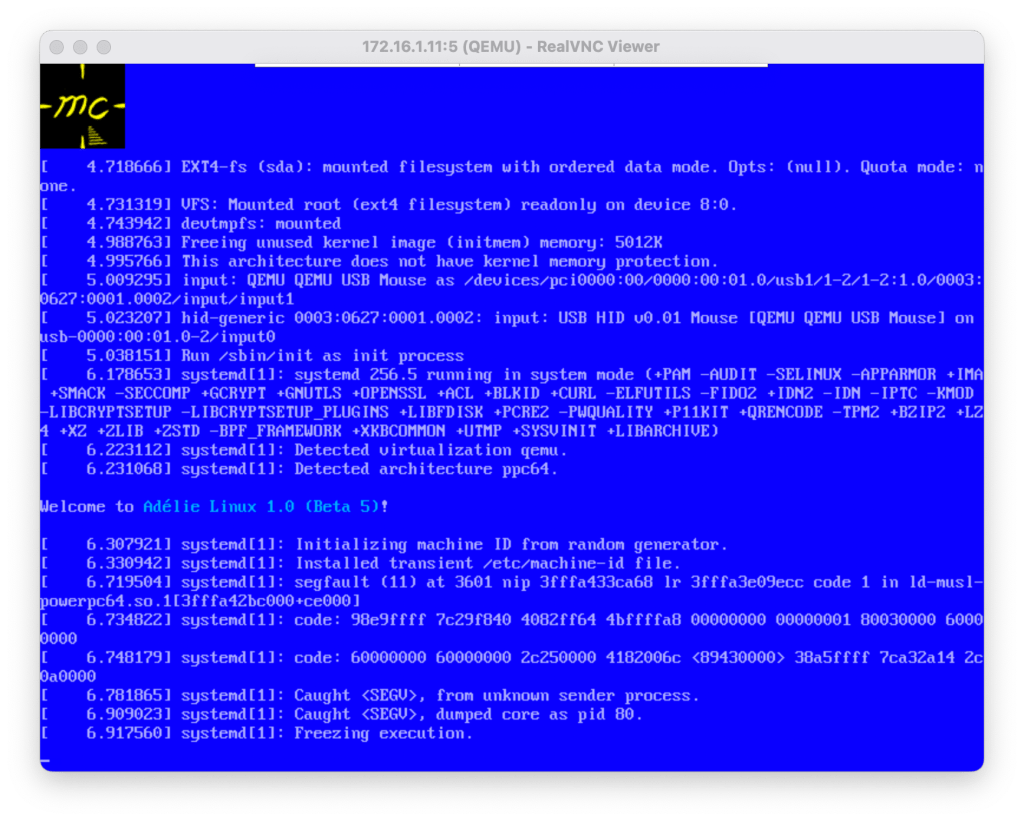
I created a small disk image and ran a very strange command: apk add adelie-base-posix dash-binsh systemd. I booted it up as a KVM VM in Qemu and saw “Welcome to Adélie Linux 1.0 Beta 5” before a rather ungraceful – and due to Qemu framebuffer endian issues, colour-swapped – segmentation fault:
Welcome to an endian-swapped systemd core dump!
Debugging this was an experience in early systems debugging that I haven’t had in years. There’s a great summary on this methodology at Linus’s blog.
It turned out that I had disabled a test from build-util as I incorrectly assumed that was only used when debugging in the build root. Since I did not want to spend time digging around how it manually parses ELF files to find their RPATH entries for a feature we are unlikely to use, I stubbed that functionality out entirely. We can always fix it later.
Recreating the disk image and booting it up, I was greeted by an Adélie “rescue” environment booted by systemd. It was frankly bizarre, but also really cool.
The first time systemd ever booted an Adélie Linux system.
From walking to flying
Next, I built test packages on the Skylake builder we are using for x86_64 development. I have a 2012 MacBook Pro that I keep around for testing various experiments, and this felt like a good system for the ultimate experiment. The goal: swapping init systems with a single command.
It turns out that D-Bus and PolicyKit require systemd support to be enabled or disabled at build-time. There is no way to build them in a way that allows them to operate on both types of init system. This is an area I would like to work on more in the future.
I wrote package recipes for both that are built against systemd and “replace” the non-systemd versions. I also marked them to install_if the system wanted systemd.
Next up were some more configuration and dependency fixes. I found out via this experiment that some of the Adélie system packages do not place their pkg-config files in the proper place. I also decided that if I’m already testing this far, I’d use networkd to bring up the laptop in question.
I ran the fateful command apk del openrc; apk add systemd and rebooted. To my surprise, it all worked! The system booted up perfectly with systemd. The oddest sight was my utmps units running:
systemd running s6-ipcserver. The irony is not lost on me.
Still needed: polish…
While the system works really well, and boots in 1/3rd the time of OpenRC on the same system, it isn’t ready for prime time just yet.
Rebooting from a KDE session causes the compositor to freeze. I can reboot manually from a command line, or even from a Konsole inside the session, but not using Plasma’s built-in power buttons. This may be a PolicyKit issue – I haven’t debugged it properly yet.
There aren’t any service unit files written or packaged yet, other than OpenSSH and utmps. We are working with our sponsor on an effort to add -systemd split packages to any of the packages with -openrc splits. We should be able to rely on upstream units where present, and lean on Gentoo and Fedora’s systemd experts to have good base files to reference when needed. I’ve already landed support for this in abuild.
…and You!
This project could not have happened without the generous sponsors of Wilcox Technologies Inc (WTI) making it possible, nor without the generous sponsors of Adélie Linux keeping the distro running. Please consider supporting both Adélie Linux and WTI if you have the means. Together, we are creating the future of Linux systems – a future where users have the choice and freedom to use the tooling they desire.
If you want to help test this new system out, please reach out to me on IRC (awilfox on Interlinked or Libera), or the Adéliegram Telegram channel. It will be a little while before a public beta will be available, as more review and discussion with other projects is needed. We are working with systemd, musl, and other projects to make this as smooth as possible. We want to ensure that what we provide for testing is up to our highest standards of quality.
As part of my work to set up infrastructure for a few projects that I hope to launch with some mates in the coming months, I needed to set up a KVM virthost using Gentoo. I decided to write up the process for FOSS Friday! This setup was performed on a Hetzner AMD server running the latest musl stage3, but glibc should be roughly the same.
Hetzner’s AMD offerings are some of the lowest cost dedicated servers with actual support and decent cross connects. All three of these factors are important to the projects that will be using this server.
Gentoo was chosen so that packages could be built with the exact configuration required. There are no extraneous dependencies that can cause vulnerabilities without even being needed or utilised by the actual workload.
The goal is for the host and guest VMs to share the same on-disk kernel. This way, the kernel is only built and updated once. All VMs will automatically boot into the new kernel when the host is rebooted into the new kernel. As such, the guests do not need a /boot or GRUB at all.
Configuring the Host
I decided to have the host and guests share virtually all of their Portage configurations, though I have not set up a centralised Git repository for them to live in just yet. The CPU_FLAGS_X86 are straight from cpuid2cpuflags. USE is “-X -nls -vala verify-sig”, a conservative but useful global-USE for lightweight, hardened infra.
The base hardware additionally needed sys-kernel/linux-firmware for AMD microcode and TCP offloading. Right now, I’m using package.accept_keywords to accept the ~amd64-keyworded version 20240115-r3. It has a significant performance improvement over 20240115 as I tweaked which firmware files are installed using savedconfig.
For package.use, the base settings I find most useful include:
# trim the fat, what we don’t need on a server dev-python/pygobject -cairo net-firewall/ebtables -perl net-libs/glib-networking -gnome net-libs/libsoup -brotli net-misc/netifrc -dhcp sys-boot/grub -fonts -themes
# eliminate circular dep dev-libs/libsodium -verify-sig
# would pull CMake into the graph net-misc/curl -http2
# Required USE for libvirt / virt-install app-emulation/libvirt lvm app-emulation/libvirt-glib introspection net-dns/dnsmasq script net-libs/gnutls pkcs11 tools sys-fs/lvm2 lvm sys-libs/libosinfo introspection
I then did a full world rebuild, followed by emerge -av eix vim sysklogd chrony libvirt virt-install.
Host-side Networking
I created a bridge interface for the guests to use, which will be a private network segment with no access to the outside world. They will still have access to the host itself, which can run a Portage rsync mirror and binpkg/distfiles host as well.
I did the configuration this way because these VMs will contain sensitive data including login information, and I wanted to be extra-paranoid about network traffic going in to them. It’s probably better to use libvirt’s NAT if possible for your use case.
I added the following stanza to my /etc/conf.d/net:
bridge_kvmbr0=""
config_kvmbr0="172.16.11.1/24"
This added an empty bridge interface, and set the guest network subnet as 172.16.11.0/24. The host will use .1. To be extra fancy, you could configure a private DNS server to listen on that IP which would allow guests to resolve each other and communicate via hostname.
Host-side Kernel Configuration
I’m using gentoo-kernel, so there wasn’t any actual Kconfig to be done, but there is the matter of setting up the “hassle-free” automatic update system that I described in the introduction.
What I did was to symlink /boot/vmlinuz-current and /boot/initramfs-current to the present version. We can set the guests to boot that, and simply update the symlinks when the kernel itself is updated.
Configuring the Guests
I used a full-disk LVM volume group on the Hetzner server’s second attached disk for guest storage. I created an LV for each guest machine, and then formatted the LV with XFS. Since the VMs don’t need a boot loader there is no reason to have a partition table at all. You can use your file system of choice; I used XFS for performance and consistency.
# lvcreate -n keycloak -L 40G hostvg
  Logical volume "keycloak" created
# mkfs.xfs /dev/hostvg/keycloak
[...]
# mount /dev/hostvg/keycloak /opt
# curl [stage 3 tarball] | tar -C /opt -xJf -
[Downloading and extracting the tarball]
# cd /opt
# mount -R /dev dev
# mount -t proc none proc
# mount -t sysfs none sys
# chroot /opt
We are now able to configure the guest environment as desired. Since there is no outbound network access, if you want network time you will need to run a network time server on the host. I personally tend to trust virtio’s RTC system as it rarely loses sync in my experience. With the present frequency of kernel and low-level system updates, it isn’t likely that any of these systems will have long enough uptimes to have tiny amounts of drift matter anyway.
We configure the guest-side networking to use the subnet we defined in the host bridge. For instance, on this VM I could use config_eth0="172.16.11.2/24". There is no reason to set routes_eth0 because the host system is not going to route packets out for it.
Setting up the Guest
Now it is time to run virt-install for the guest and boot it up. Make sure your SSH keys are installed and the chroot is unmounted first!
Let’s describe some of the fancier of these options. For a full description of the options used here and additional ones you can try, see the refreshingly coherent man page.
--boot kernel=…,initrd=…,cmdline=… This sets up the guest to boot from the host kernel, as discussed previously.
--import This tells virt-instal that we have already installed an OS to the disk provided, so it doesn’t need to perform any installation procedures. We’re “importing” an existing drive into libvirt.
-w bridge=kvmbr0,mac=52:54:00:… This configures networking to use the bridge we set up previously. Note that the MAC for each guest must be unique, and for KVM VMs it must start with 52:54:00.
Enjoy!
This article showed the overview of how I’ve configured a Gentoo machine to serve as a virthost with a dedicated private LAN segment for guests and a way to have those guests share the same kernel as the host. We also looked at a way to “cheat” on storage by using an actual file system as the attached disk.
In the next set of articles, I plan to review:
Setting up WireGuard on the host to have pain-free access to the private LAN segment from my workstation for administration purposes
Leveraging the power of Gentoo overlays and profiles to have a consistent configuration for an entire fleet of servers
Sharing /var/db/repos and /var/cache/distfiles from the host to each guest, so there is only one copy – saving disk space, bandwidth, and time



 The Cat Fox Life