A funny thing happened on the way to the Java bootstrap…

One of my best friends, Horst, is working on “bootstrapping” Java in the Adélie Linux distribution. This means we will be able to build the Java runtime entirely from source, not relying on binaries from Oracle or others – which means we can certify and trust that our Java is free from any third-party code. For a little “light reading” on this subject, see Ken Thompson’s seminal 1983 paper, Reflections on Trusting Trust, and the Bootstrappable Builds site.

Roughly, the Java bootstrap looks like this: build a very old Java runtime that was written in C++, use that to build a slightly less old Java runtime written in Java, and up from there. And while the very old Java runtime that he was using built fine on his AMD Ryzen system, and also seemed to work great on the Arm-based Raspberry Pi, it hung (locked up, froze) on my Power9-based Talos II.

Looking up JamVM on PowerPC systems, Horst found a Gentoo bug from 2007 that describes the issue exactly. There was no solution found by the Gentoo maintainers; they simply removed the ability of PPC64 computers to install the JamVM package.

This obviously wouldn’t do for us. Adélie treats the PPC64 architecture as tier-1: we have to make sure everything works on PPC64 systems. So, I dove into the code and began spelunking around for causes.

The code that ensures thread safety seemed to be at fault, but I couldn’t tease out the real issue at first. I built JamVM with ASAN and UBSAN and found a cavalcade of awfulness, including a home-grown memory allocator that was returning misaligned addresses. That’s sure to give us trouble if we ever endeavour towards SPARC. There were a few signedness errors and a single byte buffer-overrun as well.

I fixed all of those issues, and while JamVM was now “sanitiser-clean” and also reported no issues in Valgrind, it was still hanging. I added some debug statements to the COMPARE_AND_SWAP routine and found that no debugging happened. I thought that was odd, but then I saw the problem: the 64-bit code was set to only compile if “__ppc64__” was defined. Linux defines “__PPC64__”, in all-caps, not lowercase.

I changed that, and for good measure also fixed the types it uses for reading the swapped variable and returning the result, and recompiled. Lo and behold, JamVM was now working on my 64-bit PowerPC.

And that is how I accidentally stumbled upon, and fixed, a 17-year-old bug in an ancient Java runtime. That bug would have been old enough to drive…

The patch is presently fermenting in a branch in Adélie’s packages.git, but will eventually land as bootstrap/jamvm/ppc64-lock.patch.

Porting systemd to musl libc-powered Linux

I have completed an initial new port of systemd to musl. This patch set does not share much in common with the existing OpenEmbedded patchset. I wanted to make a fully updated patch series targeting more current releases of systemd and musl, taking advantage of the latest features and updates in both. I also took a focus on writing patches that could be sent for consideration of inclusion upstream.

The final result is a system that appears to be surprisingly reliable considering the newness of the port, and very fast to boot.

Why?

I have wanted to do this work for almost a decade. In fact, a mention of multiple service manager options – including systemd – is present on the original Adélie Web site from 2015. Other initiatives have always taken priority, until someone contacted us at Wilcox Technologies Inc. (WTI) interested in paying on a contract basis to see this effort completed.

I want to be clear that I did not do this for money. I believe strongly that there is genuine value in having multiple service managers available. User freedom and user choice matter. There are cases where this support would have been useful to me and to many others in the community. I am excited to see this work nearing public release and honoured to be a part of creating more choice in the Linux world.

How?

I started with the latest release tag, v256.5. I wanted a version closely aligned to upstream’s current progress, yet not too far away from the present “stable” 255 release. I also wanted to make sure that the fallout from upstream’s removal of split-/usr support would be felt to its maximum, since reverting that decision is a high priority.

I fixed build errors as they happened until I finally had a built systemd. During this phase, I consulted the original OE patchset twice: once for usage of GLOB_BRACE, and the other for usage of malloc_info and malloc_trim. Otherwise, the patchset was authored entirely originally, mostly through the day (and into the night) of August 16th, 2024.

Many of the issues seen were related to inclusion of headers, and I am already working on bringing those fixes upstream. It was then time to run the test suite.

Tests!

The test suite started with 27 failures. Most of them were simple fixes, but one that gave me a lot of trouble was the time-util test. The strptime implementation in musl does not support the %z format specifier (for time zones), which the systemd test relies on. I could have disabled those tests, but I felt like this would be taking away a lot of functionality. I considered things like important journals from other systems – they would likely have timestamps with %z formats. I wrote a %z translation for systemd and saw the tests passing.

Other test failures were simple C portability fixes, which are also in the process of being sent upstream.

The test suite for systemd-sysusers was the next sticky one. It really exercises the POSIX library functions getgrent and getpwent. The musl implementations of these are fine, but they don’t cope well with the old NIS compatibility shims from the glibc world. They also can’t handle “incomplete” lines. The fix for incomplete line handling is pending, so in the meantime I made the test have no incomplete lines. I added a shim for the NIS compatibility entries in systemd’s putgrent_sane function, making it a little less “sane” but fixing the support perfectly.

Then it was time for the final failing test: test-recurse-dir, which was receiving an EFAULT error code from getdents64. Discussing this with my friends on the Gentoo IRC, we began to wonder if this was an architecture-specific bug. I was doing my port work on my Talos II, a 64-bit PowerPC system. I copied the code over to an Intel Skylake and found the test suite passed. That was both good, in that the tests were all passing, but also bad, because it meant I was dealing with a PPC64-specific bug. I wasn’t sure if this was a kernel bug, a musl bug, or a systemd bug.

Digging into it further, I realised that the pointer math being done would be invalid when cast to a pointer-to-structure on PPC64 due to object alignment guarantees in the ABI. I changed it to use a temporary variable for the pointer math and casting that temporary, and it passed!

And that is how I became the first person alive to see systemd passing its entire test suite on a big-endian 64-bit PowerPC musl libc system.

The moment of truth

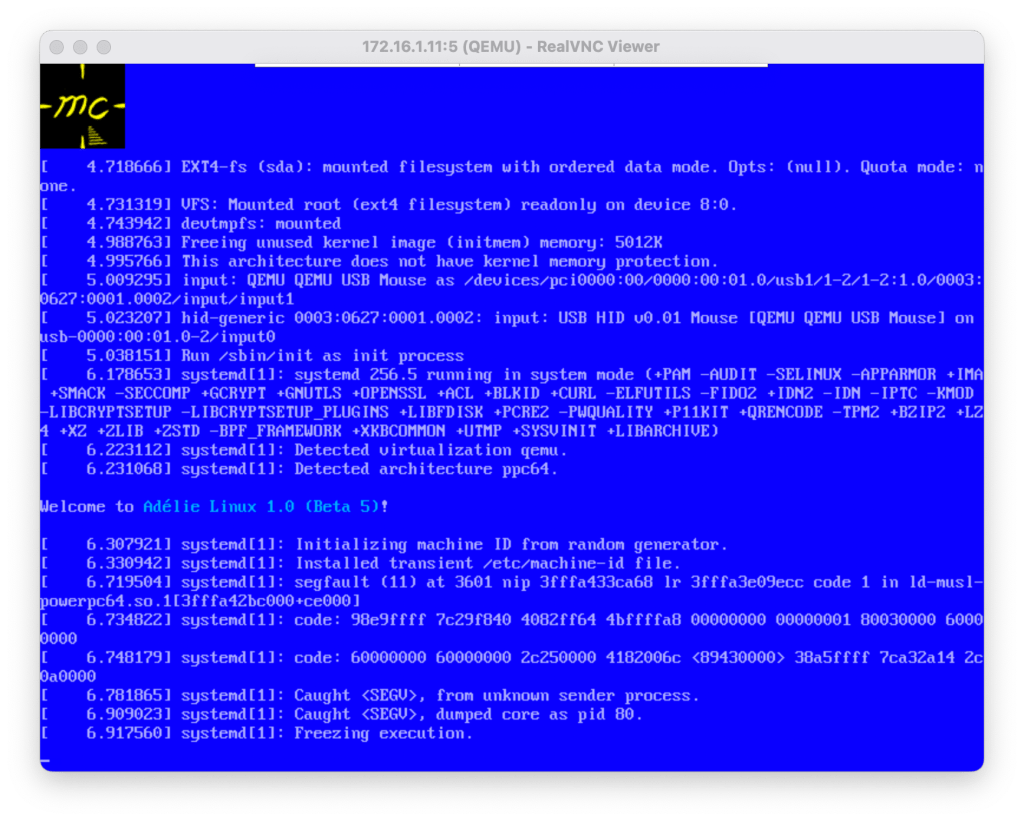
I created a small disk image and ran a very strange command: apk add adelie-base-posix dash-binsh systemd. I booted it up as a KVM VM in Qemu and saw “Welcome to Adélie Linux 1.0 Beta 5” before a rather ungraceful – and due to Qemu framebuffer endian issues, colour-swapped – segmentation fault:

Welcome to an endian-swapped systemd core dump!

Debugging this was an experience in early systems debugging that I haven’t had in years. There’s a great summary on this methodology at Linus’s blog.

It turned out that I had disabled a test from build-util as I incorrectly assumed that was only used when debugging in the build root. Since I did not want to spend time digging around how it manually parses ELF files to find their RPATH entries for a feature we are unlikely to use, I stubbed that functionality out entirely. We can always fix it later.

Recreating the disk image and booting it up, I was greeted by an Adélie “rescue” environment booted by systemd. It was frankly bizarre, but also really cool.

The first time systemd ever booted an Adélie Linux system.

From walking to flying

Next, I built test packages on the Skylake builder we are using for x86_64 development. I have a 2012 MacBook Pro that I keep around for testing various experiments, and this felt like a good system for the ultimate experiment. The goal: swapping init systems with a single command.

It turns out that D-Bus and PolicyKit require systemd support to be enabled or disabled at build-time. There is no way to build them in a way that allows them to operate on both types of init system. This is an area I would like to work on more in the future.

I wrote package recipes for both that are built against systemd and “replace” the non-systemd versions. I also marked them to install_if the system wanted systemd.

Next up were some more configuration and dependency fixes. I found out via this experiment that some of the Adélie system packages do not place their pkg-config files in the proper place. I also decided that if I’m already testing this far, I’d use networkd to bring up the laptop in question.

I ran the fateful command apk del openrc; apk add systemd and rebooted. To my surprise, it all worked! The system booted up perfectly with systemd. The oddest sight was my utmps units running:

systemd running s6-ipcserver. The irony is not lost on me.

Still needed: polish…

While the system works really well, and boots in 1/3rd the time of OpenRC on the same system, it isn’t ready for prime time just yet.

Rebooting from a KDE session causes the compositor to freeze. I can reboot manually from a command line, or even from a Konsole inside the session, but not using Plasma’s built-in power buttons. This may be a PolicyKit issue – I haven’t debugged it properly yet.

There aren’t any service unit files written or packaged yet, other than OpenSSH and utmps. We are working with our sponsor on an effort to add -systemd split packages to any of the packages with -openrc splits. We should be able to rely on upstream units where present, and lean on Gentoo and Fedora’s systemd experts to have good base files to reference when needed. I’ve already landed support for this in abuild.

…and You!

This project could not have happened without the generous sponsors of Wilcox Technologies Inc (WTI) making it possible, nor without the generous sponsors of Adélie Linux keeping the distro running. Please consider supporting both Adélie Linux and WTI if you have the means. Together, we are creating the future of Linux systems – a future where users have the choice and freedom to use the tooling they desire.

If you want to help test this new system out, please reach out to me on IRC (awilfox on Interlinked or Libera), or the Adéliegram Telegram channel. It will be a little while before a public beta will be available, as more review and discussion with other projects is needed. We are working with systemd, musl, and other projects to make this as smooth as possible. We want to ensure that what we provide for testing is up to our highest standards of quality.

Experiences with building a Gentoo virtualisation host

As part of my work to set up infrastructure for a few projects that I hope to launch with some mates in the coming months, I needed to set up a KVM virthost using Gentoo. I decided to write up the process for FOSS Friday! This setup was performed on a Hetzner AMD server running the latest musl stage3, but glibc should be roughly the same.

Hetzner’s AMD offerings are some of the lowest cost dedicated servers with actual support and decent cross connects. All three of these factors are important to the projects that will be using this server.

Gentoo was chosen so that packages could be built with the exact configuration required. There are no extraneous dependencies that can cause vulnerabilities without even being needed or utilised by the actual workload.

The goal is for the host and guest VMs to share the same on-disk kernel. This way, the kernel is only built and updated once. All VMs will automatically boot into the new kernel when the host is rebooted into the new kernel. As such, the guests do not need a /boot or GRUB at all.

Configuring the Host

I decided to have the host and guests share virtually all of their Portage configurations, though I have not set up a centralised Git repository for them to live in just yet. The CPU_FLAGS_X86 are straight from cpuid2cpuflags. USE is “-X -nls -vala verify-sig”, a conservative but useful global-USE for lightweight, hardened infra.

The base hardware additionally needed sys-kernel/linux-firmware for AMD microcode and TCP offloading. Right now, I’m using package.accept_keywords to accept the ~amd64-keyworded version 20240115-r3. It has a significant performance improvement over 20240115 as I tweaked which firmware files are installed using savedconfig.

For package.use, the base settings I find most useful include:

# prefer lighter
app-alternatives/bc -gnu gh
app-alternatives/cpio -gnu libarchive

# trim the fat, what we don’t need on a server
dev-python/pygobject -cairo
net-firewall/ebtables -perl
net-libs/glib-networking -gnome
net-libs/libsoup -brotli
net-misc/netifrc -dhcp
sys-boot/grub -fonts -themes

# eliminate circular dep
dev-libs/libsodium -verify-sig

# would pull CMake into the graph
net-misc/curl -http2

# Required USE for libvirt / virt-install
app-emulation/libvirt lvm
app-emulation/libvirt-glib introspection
net-dns/dnsmasq script
net-libs/gnutls pkcs11 tools
sys-fs/lvm2 lvm
sys-libs/libosinfo introspection

I then did a full world rebuild, followed by emerge -av eix vim sysklogd chrony libvirt virt-install.

Host-side Networking

I created a bridge interface for the guests to use, which will be a private network segment with no access to the outside world. They will still have access to the host itself, which can run a Portage rsync mirror and binpkg/distfiles host as well.

I did the configuration this way because these VMs will contain sensitive data including login information, and I wanted to be extra-paranoid about network traffic going in to them. It’s probably better to use libvirt’s NAT if possible for your use case.

I added the following stanza to my /etc/conf.d/net:

bridge_kvmbr0=""
config_kvmbr0="172.16.11.1/24"

This added an empty bridge interface, and set the guest network subnet as 172.16.11.0/24. The host will use .1. To be extra fancy, you could configure a private DNS server to listen on that IP which would allow guests to resolve each other and communicate via hostname.

Host-side Kernel Configuration

I’m using gentoo-kernel, so there wasn’t any actual Kconfig to be done, but there is the matter of setting up the “hassle-free” automatic update system that I described in the introduction.

What I did was to symlink /boot/vmlinuz-current and /boot/initramfs-current to the present version. We can set the guests to boot that, and simply update the symlinks when the kernel itself is updated.

Configuring the Guests

I used a full-disk LVM volume group on the Hetzner server’s second attached disk for guest storage. I created an LV for each guest machine, and then formatted the LV with XFS. Since the VMs don’t need a boot loader there is no reason to have a partition table at all. You can use your file system of choice; I used XFS for performance and consistency.

# lvcreate -n keycloak -L 40G hostvg
Logical volume "keycloak" created
# mkfs.xfs /dev/hostvg/keycloak
[...]
# mount /dev/hostvg/keycloak /opt
# curl [stage 3 tarball] | tar -C /opt -xJf -
[Downloading and extracting the tarball]
# cd /opt
# mount -R /dev dev
# mount -t proc none proc
# mount -t sysfs none sys
# chroot /opt

We are now able to configure the guest environment as desired. Since there is no outbound network access, if you want network time you will need to run a network time server on the host. I personally tend to trust virtio’s RTC system as it rarely loses sync in my experience. With the present frequency of kernel and low-level system updates, it isn’t likely that any of these systems will have long enough uptimes to have tiny amounts of drift matter anyway.

We configure the guest-side networking to use the subnet we defined in the host bridge. For instance, on this VM I could use config_eth0="172.16.11.2/24". There is no reason to set routes_eth0 because the host system is not going to route packets out for it.

Setting up the Guest

Now it is time to run virt-install for the guest and boot it up. Make sure your SSH keys are installed and the chroot is unmounted first!

# virt-install --boot kernel=/boot/vmlinuz-current,initrd=/boot/initramfs-current,cmdline='console=tty0 console=ttyS0 ro root=/dev/vda net.ifnames=0' --disk /dev/hostvg/keycloak -n auth01 -r 8192 --vcpus=2 --cpuset=10-11 --cpu host --import --osinfo gentoo -w bridge=kvmbr0,mac=52:54:00:04:04:03 --graphics none --autostart

Let’s describe some of the fancier of these options. For a full description of the options used here and additional ones you can try, see the refreshingly coherent man page.

--boot kernel=…,initrd=…,cmdline=…
This sets up the guest to boot from the host kernel, as discussed previously.

--import
This tells virt-instal that we have already installed an OS to the disk provided, so it doesn’t need to perform any installation procedures. We’re “importing” an existing drive into libvirt.

-w bridge=kvmbr0,mac=52:54:00:…
This configures networking to use the bridge we set up previously. Note that the MAC for each guest must be unique, and for KVM VMs it must start with 52:54:00.

Enjoy!

This article showed the overview of how I’ve configured a Gentoo machine to serve as a virthost with a dedicated private LAN segment for guests and a way to have those guests share the same kernel as the host. We also looked at a way to “cheat” on storage by using an actual file system as the attached disk.

In the next set of articles, I plan to review:

  • Setting up WireGuard on the host to have pain-free access to the private LAN segment from my workstation for administration purposes
  • Leveraging the power of Gentoo overlays and profiles to have a consistent configuration for an entire fleet of servers
  • Sharing /var/db/repos and /var/cache/distfiles from the host to each guest, so there is only one copy – saving disk space, bandwidth, and time

Until then, happy hacking!

The Sinking of the Itanic

Linux has officially had the Intel Itanium CPU architecture removed as of version 6.7 (currently unreleased). The Linux maintainers waited until the 6.6 Long Term series was released, so that users of Itanium systems would have one final LTS kernel with support for users who still desired it.

Most people don’t care a whole lot about this. A very few were happy about it, as now there is “one less old dead platform” in the Linux kernel. Some, however, were both concerned about those with remaining Itanium hardware and whether this signals an impending doom for those of us who care about other architectures.

I’d like to explore a bit about the Itanium processor, my personal feelings on this news, and my belief that this removal is not a harbinger of doom for any other architectures.

The Itanium wasn’t a typical CPU

First, let’s start with a primer on the Itanium itself. Most CPUs fall in to one of two categories: RISC, or CISC. These are “Reduced” instruction set computers, and “Complex” instruction set computers. They are named after the number of instructions that the computer understands at the lowest level.

A RISC CPU has basic operations like add, subtract, jump, and conditional. A CISC CPU has more rich operations that the CPU can do in a single operation, such as square root, binary-coded decimal, and others. This comes at the cost of extra power consumption and a much more complicated design of the chip.

Typical RISC systems that you may recognise include the PowerPC, SPARC, and MIPS. CISC systems include the Intel x86, Arm, and mainframes like System/z.

Itanium is neither CISC nor RISC. It is what is termed a “VLIW” or Very Long Instruction Word CPU. VLIW systems allow the programmer to specify things like parallelisation, instruction scheduling and retiring, and others. If these terms aren’t familiar to you, then you may already see the reason why VLIW systems aren’t popular. The expectation is that the compiler – or, at lower levels like boot loaders and compiler designs themselves, the human programmers – will perform the work of what most modern processors do in-hardware.

It was also termed an “EPIC” or Explicitly Parallel Instruction Computer, because each “slot” of the processor could actually be programmed at the same time in an assembly language stanza.

The only other “popular” VLIW systems are some graphics cards (which is why, for a time, they were the best at mining cryptocurrency) and Russia’s home-grown Elbrus architecture.

Compilers are still evolving in 2023 to handle the sorts of problems the Itanium brings to the forefront, with the goal of making code faster. The theory is that if compilers can output a more ideal ordering of instructions, code will execute faster on any architecture. However, the Itanium launched in 2001, before most compiler designers had even considered doing this sort of work.

Hardware dearth leads to port death

There are many CPU architectures in the world. I don’t personally believe Itanium is a signal that various other CPU architectures might be next for Linux’s chopping block. There are many reasons for this belief, but the most important one is that Itanium hardware has always been scarce.

At the start of the Itanium’s life, circa 2001, there were a few different vendors who shipped hardware with it. These were HP, SGI (which spun MIPS into its own company to focus on Itanium systems), and Dell. IBM did create a single Itanium-based system, but it was short-lived. Across its life, there were various other manufacturers that created a few systems. The main driver of Itanium was HP, who had a hand in creating the architecture and had to pay Intel a significant amount of money to keep producing it towards the end of its life.

Various statistics are available to show the truly surprising level of low uptake of the Itanium. Perhaps the most shocking is Gartner’s assessment in 2007 where there were 8.4 million x86s purchased, 417,000 RISCs (virtually all of them PowerPC and SPARC), and just 55,000 Itanium systems. 90% of those were from HP. HP’s offerings were very expensive, required long-term contracts, and were aimed firmly at large enterprises.

Now let us compare this with the architectures that I’ve seen the most worry for: SPARC and Alpha.

Sun sold over 500,000 SPARC systems in 1999-2000 alone, which may be more than all Itaniums that exist in the entire world right now.

It’s really hard to extrapolate sales figures for Alpha, but Compaq’s Q4’99 sales for only Western Europe were 245mm$ for Alpha. The highest priced AlphaServer I could find in Compaq’s 1999 catalogue was the ES40 6/667, at 48k$, but we’ll go ahead and double it to include potential support contracts and hardware upgrades. This leaves us with somewhere near 3,000 units shipped in a single quarter, only to Western Europe. We can assume that many businesses bought the lower end models, so these numbers are far smaller than reality. Realistically, I would assume Alpha probably sold about 100,000 units in 1999. Recall that HP’s best year of Itanium sales was 55,000 units.

Beyond that, let’s take a look at the used market. Linux contributors rarely work on these architecture ports using hardware they bought new 20+ years ago – they have used hardware that they enjoy using, and contribute with it.

Itanium systems are currently running somewhere between 600 USD and 2000 USD on eBay, with a few below 600. Most of the ones below 600 are either not working, or individual blades that must be installed to an HP BladeCenter rack system. This BladeCenter is a separate purchase, very large, and probably only usable in a real datacentre. There are also a few newer models above 2000 USD. There are 277 systems listed in the “Servers” (not “Parts”) category. The “largest” system I could find was with 4 GB RAM.

There are “more than 1,300” SPARC systems on offer on eBay, with the typical range being 100 to 300 USD. There are more costly examples, and Blade 2000/2500s (desktops with GPUs) are around 1000 USD.

There are 436 AlphaServers, and the average seems to run 400 to 1200 USD. Some of these systems have 8 GB RAM or more, and more of them seem to include seller-offered warranties than Itanium. And let us remember that Alpha was discontinued around the same time Itanium was newly introduced.

Genuine maintenance concerns

There are more than a few concerns about Itanium from a Linux kernel maintenance point-of-view. One of the most prominent is the EFI firmware. It is based on the older EFI 1.10 standard, which pre-dates UEFI 2.0 by some years and does not include a lot of the interfaces that UEFI does. By itself this isn’t a large concern, but to ensure the code is functional, it needs to be built and tested. There were simply not enough users to do this at a large enough scale. Developers wanted to work on EFI code, and did not have the ability to test on Itanium.

The architecture is different enough from any of the others that it requires special consideration for drivers, the memory manager, I/O handling, and other components. Typically, for architectures such as the Itanium, you really want one or more people who know a lot about the internals present and ready to test patches, answer questions, and participate in kernel discussions. This simply wasn’t happening any more. Intel washed their hands of the Itanium long ago, and HPE has focused on HP-UX and even explicitly marked Linux as deprecated on this hardware back in 2020.

The 68k has Amiga, Atari, and Mac communities behind it. The PowerPC is still maintained largely by IBM, even the older chips and systems. Fujitsu occasionally chimes in directly on SPARC, and there is an active community of users and developers keeping that port alive. There are a number of passionate people whether hobbyist or community-supported doing this necessary work for a number of other architectures.

Unfortunately, the Itanium just doesn’t have that organisation – and I still largely suspect that is due to a lack of hardware. There does seem to already be a small number of enthusiasts trying to save it, and I wish them the very best of luck. The Itanium is very interesting as a research architecture and can answer a lot of questions that I feel ISA and chip designers will have in the coming decades about different ways of thinking, and what works and what doesn’t work.

In conclusion

The Itanium was an odd fellow of a CPU architecture. It wasn’t widely adopted when it was around. It was discontinued by the final manufacturer in 2021. Examples for used equipment to purchase are not common and more expensive than other, better-supported architectures, which would be required to be able to maintain software for it.

While it is always disappointing when Linux drops support for an architecture, I don’t think the Itanium is some sort of siren call that implies more popular architectures will be removed. And I will note that virtually every architecture is more popular than the Itanium.