
Notes about the iBook G3 Clamshell

I’ve just repaired the hinge on my Indigo Clamshell. While I was in there, I also replaced the aging hard disk with a SD card adaptor. I wanted to write down a few notes about the process, both for posterity and so that others can benefit from my experience.

The standoffs for the hard disk caddy are brittle. I slightly over-tightened one and it snapped right off. Luckily, it snapped in a way that it would still stand solidly and hold the grounding wire of the charging board. When the Service Source manual says do not overtighten, it means it – as soon as there is the slightest resistance, stop: it’s tight.

I burned a copy of the iBook Software Restore CD from the fabulous archivists at the Garden, so that I could put the original software back on the SD card since it was empty. I used Verbatim CD-R 52x media and burned with an LG SP80NB80 on my Mac Studio.

The disc was readable by the iBook’s optical drive, but only barely; it took five minutes to show the Desktop. I’m not sure if it was the speed at which it was burned, the Verbatim media simply not agreeing with the iBook, or something about the power of the laser in the LG.
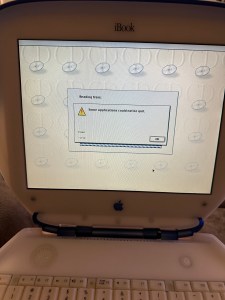
I regularly received “Some applications could not be quit.” when attempting to use Erase, and received “Restoring the software configuration iBook HD.img to volume Macintosh HD failed.” when attempting to use Restore.

I used my Power Mac G5 to read the CD and copy it to a USB key. Specifically, I used:

sudo dd if=/dev/disk3s1 of=/dev/disk2 bs=1048576

A mere 15 minutes later, I had a functional USB version of the iBook Software Restore. I then used a copy of Puma (Mac OS X 10.1.4) to install on the same partition, allowing me to dual-boot the system in both 9 and X. I have a second partition I plan to use to install Jaguar or Panther. I haven’t decided which one yet.

I’ll close with a photo of the iBook being a happy Puma. Until next time, be well!
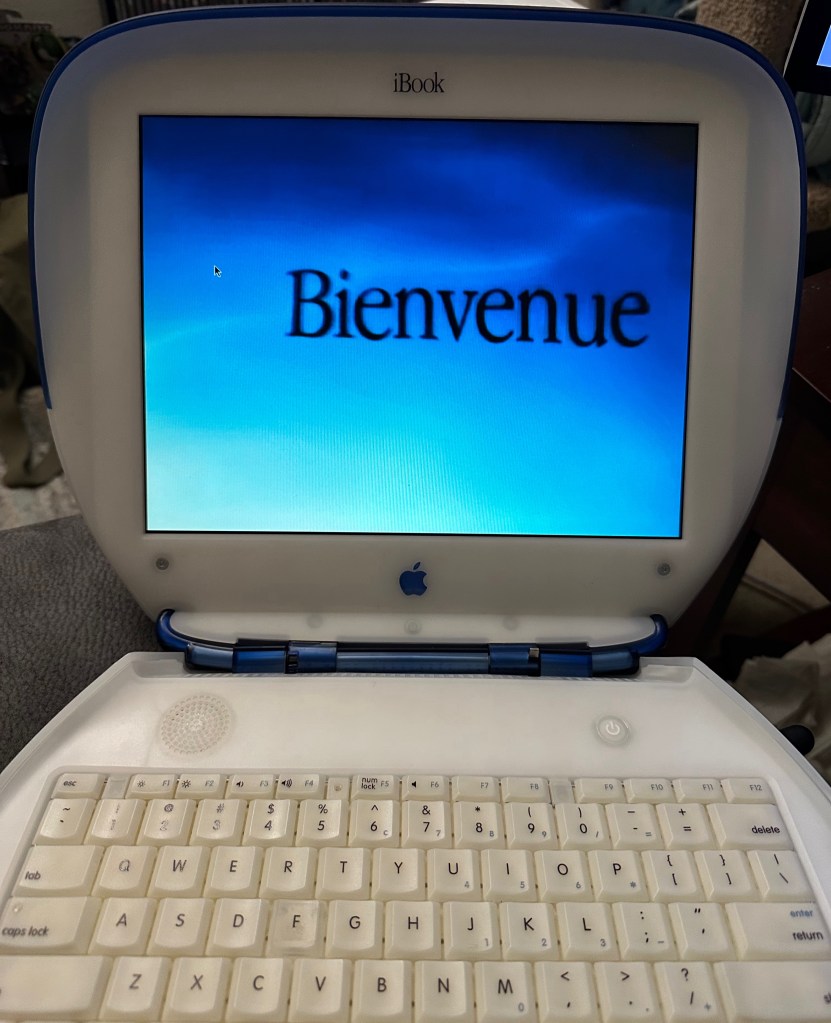
My Indigo iBook G3 Clamshell, showing the introduction video from Mac OS X “Puma” 10.1.
Happy as a clam(shell)! 😁

Compiling XIBs with CMake without Xcode

I’ve been enjoying using the JetBrains IDE CLion to do some refactoring and improvements to the Auctions code base. However, when I tried to build the Mac app bundle with it, the app failed to launch:

2022-07-30 19:54:15.117 Auctions[80371:16543044] Unable to load nib file: Auctions, exiting

The XIB files were definitely part of the CMake project. I later learned that CMake does not automatically add XIB compilation targets to a project. It relies on the Xcode generator to do that.

I found a long-archived documentation page from CMake on the Kitware GitLab that described a method to build NIB files from XIBs, and have modified it to make it simpler for Auctions.

You can see the change in the commit diff, but I’ll include the snippet here for posterity.

First, you define an array with the XIB file names with no suffix. For instance, I’ve done set(COCOA_UI_XIBS AXAccountsWindow AXSignInWindow Auctions) for the three XIB files presently in the codebase.

Then we have the loop to build them:

find_program(IBTOOL ibtool REQUIRED)
foreach(XIBFILE ${COCOA_UI_XIBS})
add_custom_command(TARGET Auctions POST_BUILD
COMMAND ${IBTOOL} --compile ${CMAKE_CURRENT_BINARY_DIR}/Auctions.app/Contents/Resources/${XIBFILE}.nib ${CMAKE_CURRENT_SOURCE_DIR}/${XIBFILE}.xib
COMMENT "Compiling NIB file ${XIBFILE}.nib")
endforeach()

Now it starts correctly and works properly when built from within CLion. This was surprisingly difficult to debug and fix, so I hope this post can help others avoid the hours of dead ends that I endured.

Until next time, Happy Hacking!

Wherefore art thou, USB-C hubs?

I’ve been looking for weeks at various stores around Tulsa, and online, for USB-C hubs. I already have a USB-C hub that has ports like Ethernet, HDMI, and USB-A. What I am looking for is a hub that has many USB-C ports.

As my Lightning cables age out, and I replace more equipment with devices that have only USB-C, more of my devices are connected this way.

My M1 MacBook Pro has two USB-C ports, but I have:

  • A USB-C SSD with my photo library.
  • My iPhone 12 with a Lightning to USB-C cable (all of my Lightning to USB-As are finally worn out).
  • My iPad mini which is USB-C to USB-C.
  • The aforementioned hub for connecting an external display.
  • Sometimes an optical drive, which yes, also uses USB-C.
  • The charging cable, because all of these devices pull a lot of power.

So, as a ballpark estimate, I need about six USB-C ports here. I really do not want to have to use a bunch of C-to-A adaptors, especially since some of my devices seem to slow down when using them. Has anyone seen anything like that out there? I drastically prefer to shop local, but at this point I would even consider buying from Amazon.

Or to put it in the words of one of my favourite bloggers: Dear lazyweb, where can I buy USB-C hubs?